




![spare parts catalog CLAAS Parts Doc Offline Update v948 [09.2026]](/imgs/type_zapch.gif)
The Claas parts catalog 09/2026 Upd v948 features step-by-step service procedures, repair illustrations, detailed wiring diagrams, and manufacturer specifications and are easy to follow.
200$
[09/2026]

| |
| Type of catalogue: | Diagnostic Software |
| Make: | Cummins |
| Region: | WorldWide |
| Inclusive languages: |
English |
| Amount of disks: |
1 DVD-DL, 2 Gb |
| OS: | Windows 10 32 bit, Windows 10 64 bit, Windows 11 64 bit |
| Price, USD: | 200 |
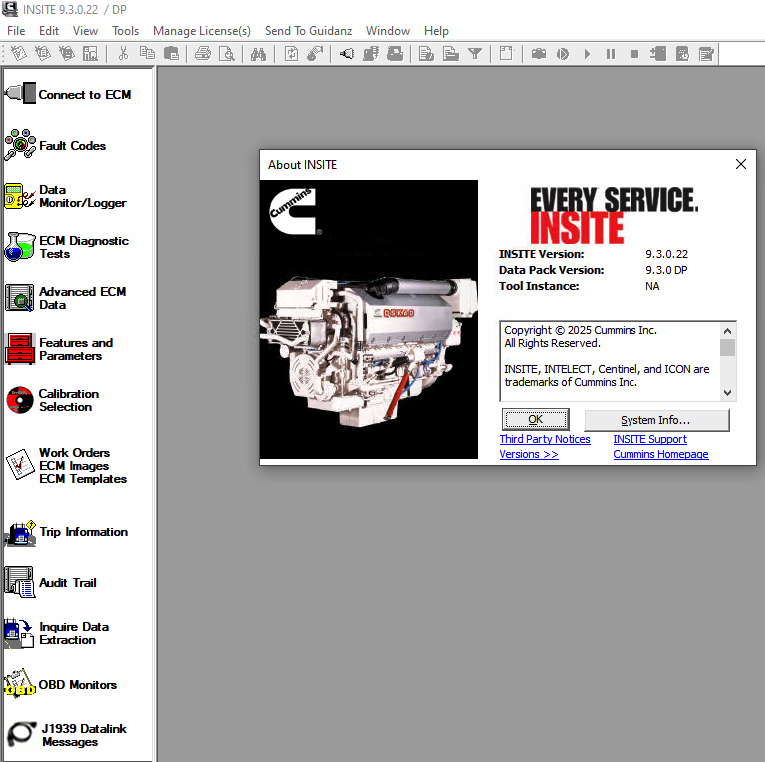
Cummins INSITE 9.3.0 Pro is a PC-based diagnostic and service application designed to communicate with Cummins electronic engines. It provides direct access to engine data, allowing technicians to perform diagnostics, adjust parameters, and complete maintenance tasks with a clear view of system behavior.
The software is widely used in workshops and fleet environments where accurate diagnostics and reduced downtime are critical. By combining live data monitoring, fault analysis, and calibration tools, INSITE supports both routine service work and more advanced troubleshooting procedures.
Software Version: INSITE 9.3.0 Pro
Access Level: Professional
Package Includes: Base installation package and activation files
The application enables access to:
INSITE requires a compatible datalink adapter supporting both J1939 and J1708 protocols for full functionality.
Note: These parameters are only visible if supported and enabled within the engine calibration.
INSITE 9.3.0 is supported on:
Not supported:
Support for older systems has been discontinued by Microsoft:
Starting from future INSITE releases (planned from March 2026), only 64-bit operating systems will be supported.
English, Chinese (Simplified), Czech, Danish, Dutch, Finnish, French, German, Greek, Indonesian, Italian, Japanese, Korean, Norwegian, Polish, Portuguese, Romanian, Russian, Spanish, Swedish, Turkish, Vietnamese
Communication-related error codes:
If automatic detection fails, manual configuration of the datalink adapter may be required.
This product is delivered digitally. After purchase, you will receive access to download the installation package along with activation files.
No physical media is shipped. The files can be installed immediately on a compatible system.
Registration and activation may require contacting an authorized Cummins distributor to obtain valid keys.
If you are working with older systems such as Windows 7, earlier INSITE versions may be required for compatibility.
The technical information from the application release notes and futures section provided by the OEM manufacturer
Our company provides for sale original spare part catalogs, workshop manuals, diagnostic software for all models of engines, cars, trucks, buses, forklifts, tractors, harvesters, cranes, buldozers, generators, construction and agricultural machines, motorcycles. To purchase a catalog online, please add the product to your cart, fill in the contact form online. Our managers proceed your order the same day.


© 2026 epcatalogs.com Cummins Insite v9.3 Pro v9.3.0.22 (replaced v8.7.0.86) + ECM Password Removal Diagnostic Software, Diagnostics, Diagnostic Software |
Terms of Service | DMCA Notice Of Copyright Infringement |


|